IT Pro Tutorials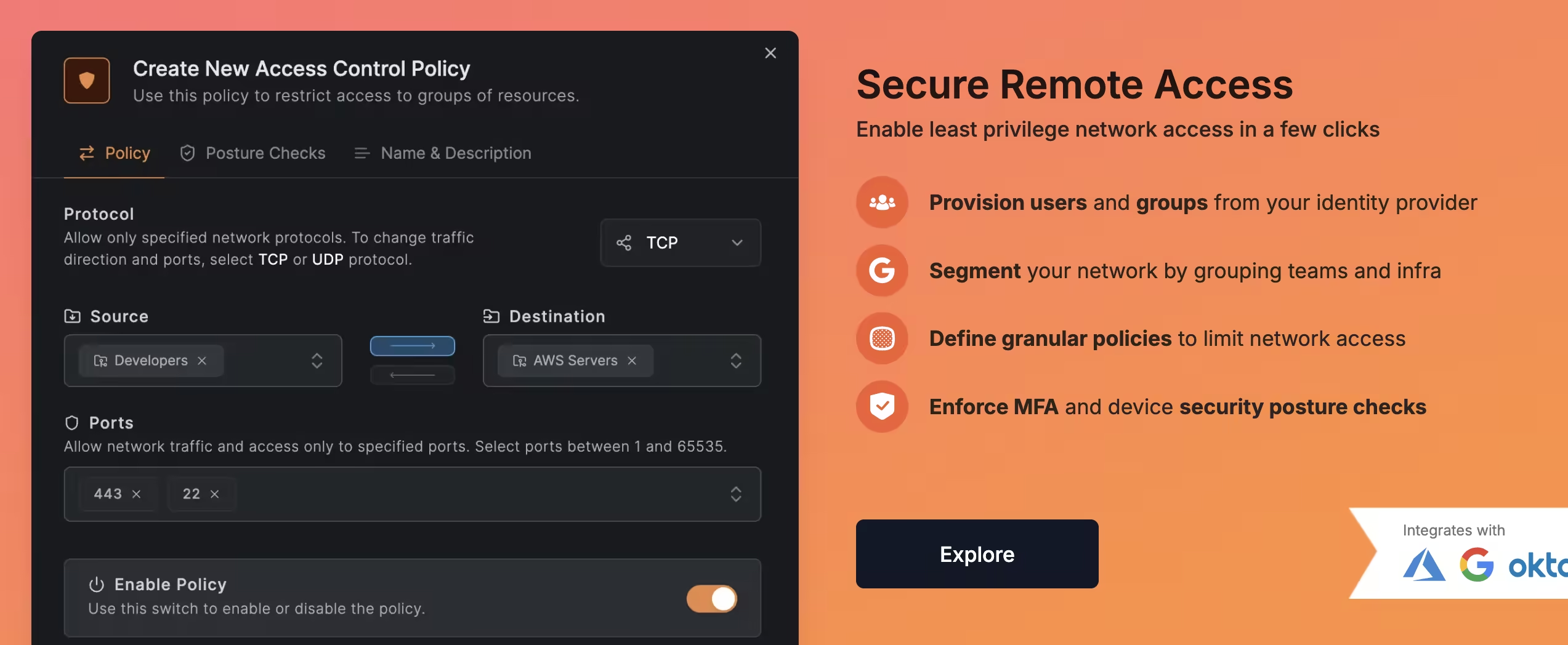
If you’re a self-hoster or IT admin tired of wrestling with traditional VPNs, meet NetBird. It’s a modern mesh VPN solution that makes secure network access ridiculously simple across locations and devices. Unlike legacy company VPN setups, NetBird doesn’t need static IP addresses or fiddling with port forwarding. Powered by WireGuard under the hood, NetBird creates an overlay network where your machines connect directly peer-to-peer over encrypted tunnels – no dedicated VPN gateway appliance needed. The result is a “just works” VPN that feels almost invisible: install the client, log in, and your devices magically form a private network, even if they’re behind NAT or spread across cloud and on-prem. In this article, we’ll explore why NetBird rocks for self-hosters and IT teams, how it stacks up against alternatives like Tailscale and ZeroTier, and some cool use cases (ever thought of running your own remote desktop hub?). Let’s dive in!
Why NetBird rocks
NetBird brings a lot to the table for anyone looking to simplify their networking life:
- Easy Setup & No Firewall Fuss: NetBird handles all the hard parts of WireGuard for you – key generation, IP assignment, and NAT traversal. You don’t need to crack open firewalls or assign static IPs for peers to reach each other; NetBird’s NAT busting tech punches through automatically. Even if a direct peer-to-peer path can’t be established, NetBird will securely relay traffic via its cloud fallback nodes, so connectivity stays reliable.
- No Open Ports Required: With NetBird, your machines initiate outbound connections to the coordination service, meaning you don’t have to open any incoming ports on your routers. This is great for security (your network stays closed to the outside) and convenience (works behind CGNAT, double NAT, etc.). It essentially behaves like a corporate Zero Trust Network Access solution – devices only accept traffic from authenticated peers, not the whole internet.
- Docker-Friendly Deployment: Are you running a homelab or using Docker containers? NetBird has you covered. The NetBird client can run as a container (they provide a Docker image on Docker Hub), which means you can easily drop it into your Docker Compose stacks or run it on a NAS. This makes it super flexible for self-hosters – for example, you could run NetBird on a Raspberry Pi or in an Unraid box as a container and instantly mesh that into your network. Many self-hosters report success using NetBird in Docker and even Kubernetes environments.
- Generous Free Tier: NetBird’s free plan is quite generous. It allows up to 5 users and 100 machines at no cost, which is plenty for a small team or an enthusiast with lots of devices. And unlike some competitors, those free users get almost all features (peer-to-peer mesh, access controls, SSO login with Google/Microsoft/GitHub, etc.). For most home and small business setups, you won’t hit the limits. Even if you do, the paid plans are reasonably priced (around $5/user/month for Team). Essentially, you can replace expensive firewall VPN appliances or cloud VPN services with NetBird and pay nothing or very little.
- Self-Hostable & Open Source: NetBird is fully open source. You can inspect the code and even run the entire control plane yourself (more on that in the next section). For the privacy-conscious and DIY crowd, this is a huge plus. You’re not locked into a proprietary SaaS – you have control. NetBird’s ethos aligns with the self-hosting community: transparency, flexibility, and community-driven development. (Fun fact: even the German government is backing NetBird’s development, which speaks to its credibility and long-term viability.)
- Perfect for Homelabs & SMBs: Because it’s easy to use and manage, NetBird hits a sweet spot for homelab tinkerers, small IT departments, and consultants managing networks for clients. It can link a handful of servers just as easily as a few hundred. If you’ve been relying on clunky OpenVPN servers or juggling dynamic DNS for remote access, NetBird will feel like a breath of fresh air. No more “did the port forward break?” or “what’s the new IP address?” headaches – everything stays connected through NetBird’s mesh.
In short, NetBird combines the security of WireGuard VPN with the convenience of a cloud-managed service, minus the usual downsides of VPN config. And it’s free/open source to boot. Not bad, right?
Self-hosting or managed? Your call
One of NetBird’s coolest strengths is flexibility in deployment. You can use NetBird’s cloud service (SaaS) for zero-hassle setup or go fully self-hosted on your own servers – whichever fits your needs.
Out of the box, most people will opt for the cloud-hosted control plane: you sign up on NetBird’s website, use their admin dashboard (hosted at app.netbird.io), and simply install the NetBird agent on your devices. The cloud service acts as the coordinator – holding your network’s state, brokering peer introductions, and providing relay servers globally. This is the fastest way to get started, and the cloud-hosted version is free for small teams as mentioned. All you maintain are the clients, and NetBird’s service does the heavy lifting of keeping the network online.
For companies or users who want complete data control (or need an on-prem solution due to policy), NetBird can be self-hosted. That means you run the management service and optional relay servers yourself. NetBird publishes a quickstart script and docs to spin up the control plane in Docker or on a VM. It’s not just one server but a few components (management API, web UI, identity provider, etc.), so self-hosting is a bit involved – but totally doable if you have some sysadmin chops. In self-host mode, you essentially run your own equivalent of the NetBird cloud: you’ll log in to your own NetBird web UI and your clients will register to your server.
Do note that the cloud version does include a few enterprise extras that you’d have to set up yourself in self-host mode. For example, NetBird’s SaaS provides globally distributed relay servers (so if two peers absolutely can’t do P2P, the traffic relays through the nearest cloud node). If you self-host, you’d have to run your own relay (TURN) servers for that fallback, which is additional complexity. Similarly, the cloud offers nice-to-haves like user invite links, third-party IdP integration (Azure AD/Okta sync, etc.), and event logging streaming – those are geared toward larger organizations. But for the core VPN functionality, both self-hosted and cloud give you the same mesh networking goodness.
Bottom line: NetBird is friendly to both worlds. If you trust the hosted service, you get a hassle-free “VPN as a Service.” If you need everything on-prem, you get a fully self-sovereign VPN solution. Very few VPN products offer this level of flexibility (for example, Tailscale officially doesn’t let you host your own control server, whereas NetBird gives you that option out of the gate). It’s the best of both worlds, letting you decide how you want to deploy.
NetBird vs the competition
How does NetBird stack up against other mesh VPN solutions like Tailscale and ZeroTier? All three aim to make secure connectivity easier, but there are some key differences in approach and features. Here’s a friendly comparison:
- Technology & Open Source: NetBird and Tailscale both build on the WireGuard protocol for fast, secure tunnels. ZeroTier uses its own proprietary protocol (not WireGuard) that emulates Layer-2 networking. NetBird and ZeroTier are fully open source (code available on GitHub), whereas Tailscale’s code is partially closed (client is open source, but the coordination server is closed-source SaaS). This means NetBird and ZeroTier officially support self-hosting, while Tailscale relies on a third-party OSS project (Headscale) if you want to go the DIY route.
- Ease of Use (UI/UX): Tailscale is known for its seamless setup – login with your Google/Microsoft account and boom, devices are connected. NetBird provides a similarly easy onboarding (SSO login, etc.), but where it really shines is the web-based admin interface. NetBird’s dashboard is clean and straightforward, letting you see your devices (peers), define access control policies, set up routes, and manage DNS all in one place. By contrast, Tailscale’s admin console is a bit more minimal and some advanced configs (like ACL rules) require editing a JSON policy file. ZeroTier has a web console for managing networks too, but it can feel a bit dated and its Flow Rules (for access control) have a learning curve. NetBird’s approach is more point-and-click, which many admins find refreshing. As one review noted, “the NetBird web interface doesn’t have a ton of features, but the important ones are there and everything is cleanly laid out.” In short, NetBird’s UI lowers the barrier to implementing granular controls – no need to be a networking guru.
- Access Controls & Policies: All three solutions allow you to restrict which devices can talk to which, but the workflow differs. NetBird has built-in groups and ACL rules in its UI – you can tag peers into groups (e.g. “servers”, “developers”) and then create allow rules for certain group->group traffic on specific ports. Tailscale supports ACLs too, but they’re defined in a policy file (in JSON) on the Tailscale admin panel. It works, but editing JSON by hand is less user-friendly. ZeroTier’s approach uses a pseudo-code called Flow Rules to permit/deny traffic, which is powerful but arguably the most complex of the three. NetBird strikes a nice middle ground by making policy management visual and intuitive. A minor limitation in NetBird today is that if you create a broad “allow all traffic” rule between two groups, it will be bidirectional by default – truly one-way rules are only achieved by specifying protocol and port (so that only one side initiates). This isn’t a deal-breaker (and the logic is similar to how security groups in cloud work), but it encourages you to design least-privilege rules (e.g. allow only RDP from Admin PC -> Server, rather than all traffic). NetBird is already oriented toward zero-trust and micro-segmentation with its posture checks and group-based rules, which gives it a slight edge for security-focused folks.
- Subnet Routing & Networking Features: All three solutions let you do subnet routing (aka site-to-site VPN). NetBird calls them Network Routes: you can designate a client as a gateway to an entire LAN or VPC. Tailscale calls this subnet routers or exit nodes (running a node with
--advertise-routes). ZeroTier lets you assign managed routes in the network config. NetBird’s UI again makes this straightforward – you add a route, pick the peer that will act as gateway, and voila. It even supports high availability for routes: if you assign multiple peers to the same subnet route, it will automatically do failover and load balancing between themdocs.netbird.io. For example, two NetBird nodes in an office can both serve as gateway; other peers will auto-select the best path. Tailscale recently added subnet router failover as well (if two nodes advertise the same subnet, one is primary). ZeroTier can have multiple members route the same subnet but you’d need to manage metrics manually. Another neat feature: NetBird has built-in DNS management for your VPN network (similar to Tailscale’s MagicDNS). You can assign a custom domain suffix and have peers resolve each other’s names, and even create DNS forwarding rules for other domains. This is great for making the mesh feel like a unified environment (no need to memorize IPs). - Performance: All use peer-to-peer connections with encryption, so performance is generally excellent (line-rate in many cases). WireGuard (used by NetBird and Tailscale) is extremely fast – often you can saturate your bandwidth. ZeroTier’s protocol is also efficient but may add a bit more overhead for encryption and virtualization of Ethernet. In practice, speed differences are minor unless you’re pushing gigabits. One consideration: if traffic has to relay (due to NAT restrictions), Tailscale and NetBird use centralized relay servers (DERP for Tailscale, TURN for NetBird), while ZeroTier uses its root servers. Throughput in relay mode is typically lower (because it’s going through a middleman on the internet). NetBird gives you the option to self-host your own relay if needed, or the cloud will choose an optimal relay near your region.
- Pricing (Free Tiers): This is where things recently got interesting. NetBird, as mentioned, offers 100 machines and 5 users freegralio.ai. Tailscale’s free plan was originally just 1 user, but they’ve expanded it – now it’s up to 3 users on a personal domain and 100 devices in a tailnet, which is quite generous too. Both NetBird and Tailscale’s free offerings cover most needs of hobbyists and small teams. ZeroTier’s free tier, on the other hand, has shrunk over time – it went from 50 devices, to 25, and now to only 10 devices free for new accounts. If you have more than 10 devices in a ZeroTier network, you’ll need a paid plan (their pricing uses a “node pack” model, e.g. $X per 25 devices). This shift has made some users look for alternatives like NetBird or Tailscale, which allow many more devices free. For larger deployments or business features: NetBird’s paid plans start at $5/user/month (unlimited users, more machines, SSO integration with your own IdP, etc.), which undercuts Tailscale’s equivalent ($6/user for their team plan)gralio.ai. ZeroTier’s paid plans (Essential/Premium) are priced by device count and can get pricey unless you just need a handful more nodes. The takeaway: NetBird and Tailscale currently have the more generous free tiers for most use cases, while ZeroTier might cost you sooner if you have lots of devices.
To summarize the above in a quick glance, here’s a comparison table of NetBird vs. Tailscale vs. ZeroTier on key points:
| Feature | NetBird (🕊️) | Tailscale (🦎) | ZeroTier (🛸) |
|---|---|---|---|
| UI/UX | Web-based dashboard for easy management of peers, ACLs, DNS, etc. (clean & simple interface)reviews.ofb.biz. | Polished client apps; admin console uses config files for ACLs (simple for basic use, but advanced settings require JSON editing). | Web portal for network config; basic UI, advanced control via Flow Rules (can be complex for newcomers). |
| Self-Hosting | ✅ Yes – Fully open source; you can self-host the control plane and even relaysnetbird.io. | ❌ Not officially (Closed-source server; community project Headscale provides unofficial self-host option). | ✅ Yes – Open source; you can run your own network controller, though official setup is cloud-based. |
| Routing Config | GUI-driven Network Routes; designate peers as subnet gateways with a few clicks (supports multiple gateways for failover)docs.netbird.io. Also supports exit nodes for internet traffic. | Subnet routers via client flag; requires enabling routes in admin panel and adjusting ACLs. Supports exit nodes. Setup is fairly easy but uses CLI/JSON for config. | Managed routes defined on web console; pick a member as gateway for a given subnet. Straightforward for basic use. (No built-in high-availability unless configured manually.) |
| Access Control | Granular ACL policies with source/dest groups and port rules. Default is full mesh open, but you can enforce least-privilege easily in UI. (One-way rules require port-specific allows)docs.netbird.io. SSO/MFA support for user auth. | ACL rules configured in a JSON policy file (powerful but not visual). Offers node tags and auto approvers for ACL flexibility. All traffic is encrypted; can enforce key expiry and require re-auth for nodes (in higher tiers). | All nodes in a network can communicate by default; Flow Rules allow custom allow/deny logic (with a learning curve). No built-in identity integration – uses network IDs and node auth. |
| Free Plan | 5 users, 100 devices freegralio.ai. Includes key features (ACL, DNS, routes, SSO via Google/Microsoft auth). Great for small teams or homelabs. | 3 users, 100 devices freenews.ycombinator.com. Intended for personal/family use; nearly all features included. Business plans start ~$6/user/month for more users. | 10 devices free (new Basic plan)discuss.zerotier.com. Additional devices require paid packs or subscription. Used to allow more devices, but recent changes limit free usage significantly. |
(🕊️ NetBird, 🦎 Tailscale, 🛸 ZeroTier) – all three are capable mesh VPN solutions; NetBird distinguishes itself with openness, a friendly UI, and flexible self-hosting, while Tailscale shines in polish/ease and ZeroTier in unique L2 capabilities. The best choice depends on your specific needs, but NetBird is clearly a strong contender for those seeking a self-hostable, cost-effective alternative.
Use case example: remote desktop hub with Guacamole + NetBird
To illustrate NetBird in action, let’s walk through a cool real-world scenario. Suppose you manage multiple sites or home labs and want a centralized remote desktop gateway to access machines across all those networks. Apache Guacamole is a popular web-based remote desktop hub (it lets you RDP or SSH into various machines from your browser). By pairing Guacamole with NetBird, you can create your own secure “remote desktop cloud” spanning all your locations – without exposing any RDP ports to the internet.
How would this work? Imagine you run an Apache Guacamole server in Docker on a VPS or in one of your data centers. This Guacamole instance will be the central interface where you connect from your browser. Now, you also run a NetBird container alongside Guacamole (in the same Docker Compose stack or on the same host). The NetBird agent joins your private mesh VPN, which includes nodes at each of your sites.
For each remote site, you install a NetBird client on a machine that can reach the local desktops you want to control. It could be directly on each target machine (each server/PC runs NetBird), or on a single gateway device in that LAN. You might set up a small Docker or Linux VM at the site running NetBird and perhaps Guacamole Remote Desktop Protocol (guacd) if needed – but to keep it simple, let’s say each target machine just runs NetBird.
Now all these devices – your Guacamole server and the remote PCs – are in the same NetBird virtual network. They get NetBird IPs (e.g. 100.64.x.x addresses). In Guacamole, you can configure connections to the remote PCs using those private IPs (and the RDP or SSH ports on them). Thanks to NetBird’s mesh, the Guacamole server can reach those remote machines directly as if they were on a LAN, even if they’re behind NAT at various sites. No VPN client needed for end-users – they just access Guacamole’s web UI, and Guacamole connects through NetBird to the machines.
You’d likely set up your NetBird access policies so that the Guacamole server is allowed to contact the other devices on the needed ports (e.g. TCP 3389 for RDP, 22 for SSH). Everything remains locked down – only Guacamole’s server can initiate RDP, and only via the encrypted NetBird tunnel. You’re essentially building a site-to-site VPN linking all locations, with Guacamole as the central jump box.
To make it concrete, here’s a simplified snippet from a hypothetical docker-compose.yml for the Guacamole server with NetBird:
services:
  netbird-sidecar1:
    image: netbirdio/netbird:latest
    container_name: netbird-sidecar1
    cap_add:
      - NET_ADMIN
      - SYS_MODULE
    devices:
      - /dev/net/tun
    volumes:
      - netbird_data1:/etc/netbird
    environment:
      - NB_SETUP_KEY=${NB_SETUP_KEY}
    ports:
      - 127.0.0.1:8282:8080
    restart: unless-stopped

  guacamole:
    container_name: guacamole_compose
    build: ./rsc/
    restart: unless-stopped
    network_mode: "service:netbird-sidecar1"
    environment:
      GUACD_HOSTNAME: localhost
      POSTGRES_DATABASE: ${POSTGRES_DB}
      POSTGRES_HOSTNAME: localhost
      POSTGRES_PASSWORD: ${POSTGRES_PASSWORD}
      POSTGRES_USER: ${POSTGRES_USER}
      GUACAMOLE_HOME: /etc/guacamole

  postgres:
    container_name: postgres_guacamole_compose
    image: postgres:15.2-alpine
    restart: unless-stopped
    network_mode: "service:netbird-sidecar1"
    environment:
      PGDATA: /var/lib/postgresql/data/guacamole
      POSTGRES_DB: ${POSTGRES_DB}
      POSTGRES_PASSWORD: ${POSTGRES_PASSWORD}
      POSTGRES_USER: ${POSTGRES_USER}
    volumes:
      - ./init:/docker-entrypoint-initdb.d:z
      - ./data:/var/lib/postgresql/data:Z

volumes:
  netbird_data1:
In the above, the NetBird container joins the mesh network using a Setup Key (a pre-generated token from the NetBird dashboard that lets headless instances enroll). We run it in host mode so it can manage the network interface directly. Guacamole container then simply binds to port 8080 for UI access. Once this is up, the Guacamole server appears as a peer in your NetBird network (with an IP like 100.91.63.155, for example), and it can connect to other peers.
Now you can add connections in Guacamole’s UI for each remote machine: e.g. “Office PC 1 – RDP to 100.91.51.137” and “Office Linux – SSH to 100.92.2.189” (these are example NetBird IPs of those devices). When you launch those from Guacamole, it will go through NetBird tunnels to reach them. From the user perspective, you have a single web portal to all your machines, and from a security perspective, none of those remote desktops were ever exposed to the internet – only the Guacamole web UI might be (and you could even put that behind a VPN or require 2FA).
This kind of cloud-hosted Bastion setup is incredibly useful for IT admins. NetBird basically acts as the glue connecting everything securely. Even if the sites are behind carrier-grade NAT or dynamic IPs, it doesn’t matter – NetBird links them. You’ve effectively created your own private network-of-networks, with a central remote access point. It’s like having a corporate “remote desktop gateway” but entirely built with open source tools and without a costly MPLS or dedicated VPN appliance at each site.
And while we chose Apache Guacamole here, you could achieve similar results with other tools. Some people run MeshCentral or RustDesk servers for remote access and use NetBird to connect agents. Others might simply SSH or RDP directly using NetBird (with no Guacamole) – e.g. leave NetBird running on your laptop and on your servers, and just RDP by NetBird IP. The possibilities are many; the key point is NetBird’s mesh makes it trivial to reach any resource anywhere, as long as a NetBird peer in that network can talk to it.
Access control done right
In any VPN or network solution, access control is critical. NetBird gives you fine-grained control over who can access what – embracing a “least privilege” philosophy from the start. Here’s how you can lock things down (and some tips from our experience):
By default, when you create a NetBird network, it starts with a “Default” policy that puts everyone in an All group with full accessdocs.netbird.iodocs.netbird.io. This means initially it behaves like a flat LAN: any device can talk to any other. That’s convenient for quick setups, but in production you’ll likely want to tighten it. NetBird lets you define Groups and then create Policies to allow specific traffic between groups. For example, you might create a group “Servers” and another “Admins”. Then add a policy: “Allow RDP (TCP 3389) from Admins -> Servers”. This would let only the admin machines initiate RDP to the servers. Everything else remains blocked.
NetBird’s policy engine can filter by protocol and port, and you can choose one-way or bidirectional rules. As mentioned earlier, if you allow “All traffic” between two groups, it inherently becomes bidirectional (both sides can initiate), because that’s effectively saying they’re in the same private network without restrictions. To enforce truly unidirectional access, you specify the port and protocol in the rule (since a TCP port rule only permits traffic when initiated from the defined source side). It’s a slight nuance: broad rules = two-way, specific port rules = one-way. In practice, it’s wise to be specific anyway – this aligns with zero-trust best practices. Only open what needs to be open. NetBird encourages this by making it easy to add multiple narrow rules rather than one big blanket allow.
Another nice aspect is you can leverage user identity. Since NetBird ties into SSO, you know exactly which user added a device, and you can segregate access per user or role. For instance, give each team or client their own group and they can’t even see resources outside their group. NetBird is working on posture checks and device authentication policies (in its business tier) – like ensuring a device is healthy or approved before it’s allowed on the network, and requiring periodic re-auth (MFA) for devices. These features show NetBird’s focus on secure access design.
One current limitation to note: at present NetBird’s UI only supports “allow” rules (permit traffic), not explicit deny rules. The model is default deny (if no allow policy, traffic is blocked). This keeps things simple: you start from a lockdown stance and open holes as needed. It covers most scenarios, though very complex setups with overlapping rules might want explicit deny for clarity – presumably something that could come in future. For now, the approach works well: define your groups, then define what’s allowed between them, and by omission everything else is denied.
In summary, NetBird’s access control is powerful yet approachable. You don’t have to learn a policy language (unlike with Tailscale or ZeroTier); you can click together rules that read like plain English. The result is you can achieve a least-privilege network – for example, only your Jump Host can SSH into servers, only your Monitoring box can ping certain nodes, etc. – without tearing your hair out. For self-hosters, this means better security for those services you expose via NetBird. For companies, it means you can meet internal security requirements (network segmentation, compliance, etc.) with ease. It’s a refreshing change from the old days of either having a totally open VPN or doing complex iptables/firewall rules on every client.
Subnet gateway magic (site-to-site made easy)
We touched on this earlier, but it’s worth exploring NetBird’s Subnet Gateway capabilities in more depth. This feature is often called “network routes” or site-to-site routing, and it’s a godsend if you want to connect entire networks (not just individual devices) through the VPN.
The scenario: You have a remote office network (say 192.168.10.0/24) or a VLAN with devices that can’t run the NetBird client. Perhaps some IoT gadgets, printers, or an ESXi host. You still want to access those over NetBird. How? By appointing one of your NetBird-enabled machines to act as a gateway for that subnet. In NetBird, you’d go to the Network Routes section in the dashboard, click “Add Route”, and input the subnet (192.168.10.0/24) and select which peer will be the gateway for it. That peer must be a device that’s on-site and has access to that subnet (for example, a Linux box with NetBird installed and an Ethernet connection to the LAN).
Once you add the route, NetBird distributes it to the other peers. Now all your NetBird clients know that to reach 192.168.10.x, they should tunnel through the chosen gateway peer. This is analogous to setting up a site-to-site VPN, but it took only a minute and no manual config on the client side. Your laptop could now SSH into a router at 192.168.10.1 via the NetBird VPN, even though that router isn’t a NetBird peer itself – the gateway peer forwards the traffic.
NetBird supports some nifty extras here. If you have multiple peers that could act as gateways for the same subnet, you can add them all to the route. NetBird will then operate in High Availability (HA) mode for that route. Peers on the network will automatically choose the best gateway (based on a metric or which one has a direct connection vs relayed, etc.), and if one gateway goes down, the others take over. This is basically built-in redundancy for your site tunnels, which is awesome for reliability. You could have two NetBird nodes in an office (maybe on different internet uplinks) advertising the office LAN – if one fails, traffic seamlessly fails over to the other. NetBird’s documentation confirms that any number of peers can form an HA route set, and it picks the route with lowest metric (priority) and best connectivity.
Another trick: NetBird allows “distribution groups” for routes. This means you can control which peers should receive a given route. For example, perhaps you only want certain admin machines to be able to access a sensitive subnet; you could put those peers in a group and assign that group as the distribution for the route. Others not in the group won’t even get the route pushed to them. This adds an extra layer of access control on top of the ACL policies.
And yes, you can also designate exit nodes in NetBird – essentially a 0.0.0.0/0 route for sending internet traffic through a peer (like a proxy/VPN gateway). This is useful if you need to funnel traffic through a certain location (for instance, to egress from a specific IP for audit or to reach internal-only internet resources via that egress). It works similarly by setting a route for 0.0.0.0/0 and enabling masquerading (so the gateway NATs your traffic to the internet).
To put it simply, NetBird makes what used to be complicated (site-to-site and hub-and-spoke VPNs) boringly simple. It’s point-and-click networking. You don’t have to manually configure routes on each client or mess with OpenVPN iroutes or IPsec policies – the controller handles it. And by using modern protocols (WireGuard and ICE for NAT traversal), it’s efficient and resilient. Whether you’re linking two offices, pulling in a cloud VPC network, or enabling access to your home LAN while on the road, the Subnet Gateway magic in NetBird has you covered.
Dive deeper into NetBird and VPN networking
If NetBird has caught your attention, we’ve written several in-depth guides to help you go further:
- NetBird CLI and API Guide — Master NetBird’s command-line tools and REST API to automate peer management, access policies, and network routes.
- NetBird vs Tailscale: Full Comparison — A deep head-to-head comparison covering self-hosting, pricing, ACLs, and real deployment experience.
- Best Self-Hosted VPN Solutions in 2026 — Our complete guide comparing NetBird, Headscale, WG-Easy, Netmaker, Firezone, and more.
- VPN Solutions for MSPs — If you manage client networks, see how NetBird fits into multi-tenant remote access for managed service providers.
- WireGuard Setup Guide — Understand the protocol under NetBird’s hood by setting up a raw WireGuard server step by step.
Conclusion
NetBird is a game-changer in the VPN space, especially for those of us who value flexibility, security, and cost-effectiveness. It combines the best aspects of enterprise VPNs and modern cloud orchestration: you get a secure WireGuard-based network with fine-grained control, without the pain of manual config or maintaining VPN appliances. For self-hosters and IT admins, it’s a dream come true – you can self-host it if you want, integrate it into your existing Docker/K8s workflows, and avoid proprietary lock-in. For small companies, NetBird can replace expensive firewalls or clunky site-to-site setups with a solution that “just works” across laptops, servers, and even mobile devices.
Let’s recap the highlights:
- Simplicity: No more struggling with firewall rules or dynamic DNS. NetBird’s NAT traversal and automatic peer discovery mean your devices connect securely from anywheredocs.netbird.io. The web UI makes management point-and-click.
- Security: Built on WireGuard’s rock-solid encryption, with support for SSO/MFA and granular ACLs encouraging least-privilege access. Your network can be completely closed off to the outside world yet seamlessly connected internally.
- Flexibility: Cloud-hosted or self-hosted – your choice. Run NetBird in the cloud for convenience or on-prem for total control. Use it for individual device VPN or full network bridging (or both). It works across cloud, on-prem, and even mobile (NetBird has clients for all major OS).
- Cost: Extremely generous free tier (up to 100 devices) means many will pay $0. If you need more, the pricing is startup-friendly. By leveraging NetBird, you might save thousands on hardware VPNs or cloud VPN fees, all while getting equal or better functionality.
- Mesh Networking Awesomeness: NetBird truly enables that any-to-any connectivity that modern teams need. Developers can hit dev environments, admins can reach infrastructure, remote workers can access office resources – all without complex network reconfigurations. It’s like having your own private virtual LAN that extends wherever you need it.
In our tests and examples (like the Guacamole RDP hub), NetBird proved to be reliable and efficient. It feels like the natural evolution of VPN technology – aligning with the Zero Trust model (authenticate everything, trust nothing by default) and making secure networking accessible to the layman.
If you’re currently using something like Tailscale or ZeroTier, you’ll find NetBird familiar but refreshingly open and adaptable. If you’ve been sticking with manual WireGuard setups, NetBird will save you a ton of time and give you features you didn’t even know you wanted (central management, ACLs, etc.). And if you’re new to the whole thing, NetBird is a forgiving place to start – you can’t really misconfigure it into oblivion, and the docs/community are there to help.
Give NetBird a try and see how it fits your environment. Say goodbye to VPN nightmares and hello to easy, secure networking. 🚀